
Track Recurring Affiliate Commissions Automatically
Stop tracking recurring commissions in spreadsheets. Trackli automates the entire process — from catching renewal events to calculating commission amounts to scheduling payouts. Every subscription payment is automatically linked to the affiliate who brought the customer in.
How to Set Up Recurring Commissions Affiliate Tracking
Get up and running in minutes with these simple steps.
Enable Recurring Commission Mode
Toggle recurring commission tracking in your program settings. Define the commission duration, rate, and any decay schedule for long-term tracking.
Connect Subscription Events
Ensure your billing provider sends renewal, upgrade, downgrade, and cancellation events to Trackli via webhooks.
Configure Commission Decay (Optional)
Optionally set commission rates that decrease over time. For example, 30% for months 1-6, 20% for months 7-12, and 10% thereafter.
Set Minimum Payout Thresholds
Define minimum balances before payouts are processed. This reduces transaction costs on small recurring commissions.
Review Monthly Commission Reports
Trackli generates monthly reports showing recurring commissions earned, pending, and paid. Export for accounting or sync to your finance tools.
How It Works
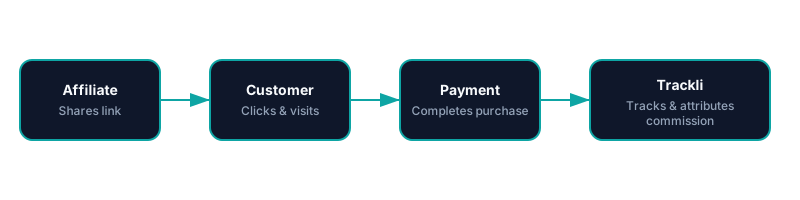
From referral link to commission approval — fully automated with Recurring Commissions. You pay your affiliates however you already do.
Frequently Asked Questions
What is commission decay and should I use it?
How does Trackli handle failed subscription payments?
Can I forecast future recurring commission obligations?
How are recurring commission payouts structured?
Does Trackli generate tax documents for affiliates?
Related Use Cases
Explore more ways to use Trackli for affiliate tracking.
Affiliate Tracking for SaaS with Recurring Revenue
The defining feature of SaaS is recurring revenue, and your affiliate tracking should reflect that. Trackli automatically tracks every renewal payment back to the original referring affiliate, calculating commissions month after month without manual spreadsheets or workarounds.
Learn moreTrack Affiliate Sales for Subscriptions
Subscription sales require attribution that persists beyond the first transaction. Trackli tracks the complete journey — from an affiliate's referral link click through subscription activation and every subsequent renewal — so you always know which partners are driving your recurring revenue.
Learn moreAffiliate Tracking for Subscription SaaS
Subscription SaaS businesses need affiliate tracking that understands recurring revenue. Trackli tracks the entire customer lifecycle from initial referral through trial conversion, monthly renewals, upgrades, and even churn — attributing every event to the right affiliate partner.
Learn moreReady to launch your affiliate program?
Start tracking affiliate referrals in minutes. No complex setup, no enterprise pricing.