
Affiliate Tracking for iOS App Store Apps
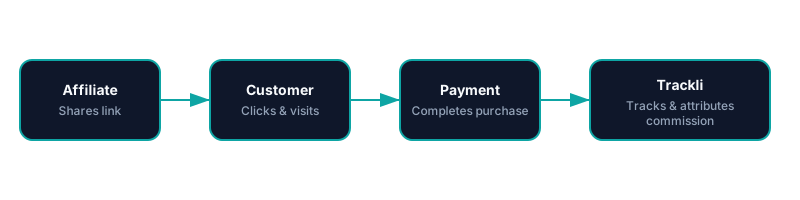
Apple's App Store doesn't expose referral data to developers directly. Trackli bridges this gap by tracking affiliate clicks before the App Store redirect, then matching installations and purchases via server-side receipt validation to accurately attribute conversions to affiliates.
How to Set Up App Store (iOS) Affiliate Tracking
Get up and running in minutes with these simple steps.
Create Pre-App-Store Landing Pages
Build lightweight landing pages that affiliates link to. These pages capture the referral, set attribution data, then redirect users to the App Store listing.
Integrate Trackli SDK in Your App
Add the Trackli SDK to your iOS app. On first launch, it checks for stored attribution data and reports the install to Trackli's servers.
Configure Receipt Validation Webhook
Set up App Store Server Notifications to forward to Trackli. We validate purchases and subscriptions to confirm revenue attribution.
Map In-App Purchase Revenue
Define which in-app purchases and subscription tiers are commissionable. Set rates based on the actual revenue after Apple's 15-30% cut.
Launch and Recruit Mobile Affiliates
Target app review sites, mobile-focused YouTubers, and app directory listings. Provide affiliates with deep links and promotional assets.
How It Works
From referral link to commission payout — fully automated with App Store (iOS).
Trackli vs Traditional Affiliate Tracking
See how Trackli compares to manual or legacy affiliate solutions.
| Feature | Trackli | Traditional |
|---|---|---|
| App Store Download Attribution | Pre-store click capture with post-install SDK confirmation | No way to track through App Store redirect |
| In-App Purchase Tracking | Server-side receipt validation for accurate revenue data | Client-side tracking easily bypassed or lost |
| Apple's Revenue Share Awareness | Commissions calculated after Apple's 15-30% cut | Commission on gross price without platform fee adjustment |
| Subscription Renewal Tracking | Tracks auto-renewals via App Store Server Notifications | Cannot track renewals happening within the App Store |
| Attribution Window | Configurable attribution window from 7 to 90 days | Fixed short attribution window |
| Fraud Prevention | Server-side receipt validation prevents fake install claims | Vulnerable to click fraud and install spoofing |
Frequently Asked Questions
How can Trackli track App Store installs when Apple controls the download?
Does Trackli account for Apple's commission on in-app purchases?
Can I track both free app installs and paid conversions?
How does Trackli prevent fake install fraud?
What's the attribution window for App Store installs?
Related Use Cases
Explore more ways to use Trackli for affiliate tracking.
Affiliate Tracking for Google Play Apps
Google Play offers referral URL parameters that most developers underutilize. Trackli combines Play Store campaign links with server-side purchase verification to build a complete affiliate attribution system for Android apps, from click to install to purchase.
Learn moreAffiliate Tracking for Shopify Apps
The Shopify App Store drives organic installs, but affiliate partners can amplify your reach outside the marketplace. Trackli helps Shopify app developers track referrals from blogs, YouTube reviews, and partner promotions that lead to app installs and paid subscriptions.
Learn moreAffiliate Tracking for Micro-SaaS
Micro-SaaS products thrive on word-of-mouth and niche communities. Trackli gives solo founders and small teams an affordable affiliate program that doesn't require enterprise budgets or complex technical integration — set it up in an afternoon and start growing.
Learn moreReady to launch your affiliate program?
Start tracking affiliate referrals in minutes. No complex setup, no enterprise pricing.