
Affiliate Tracking for Google Play Android Apps
Google Play offers referral URL parameters that most developers underutilize. Trackli combines Play Store campaign links with server-side purchase verification to build a complete affiliate attribution system for Android apps, from click to install to purchase.
How to Set Up Google Play Affiliate Tracking
Get up and running in minutes with these simple steps.
Set Up Google Play Campaign Links
Generate Play Store URLs with UTM and referrer parameters for each affiliate. Google Play passes these parameters to your app on first launch.
Add Trackli SDK to Your Android App
Integrate the Trackli SDK which reads the Play Store install referrer. On first launch, the SDK reports the attribution data including the affiliate identifier.
Connect Google Play Developer API
Link your Play Console via service account credentials. Trackli uses the Purchases API to verify subscriptions and in-app purchases server-side.
Configure Android-Specific Commission Rules
Set commission rates accounting for Google's 15-30% service fee. Define rules for one-time purchases, subscriptions, and consumable in-app purchases.
Monitor Install Quality Metrics
Track install-to-activation rates, day-1 and day-7 retention, and purchase conversion by affiliate to identify your most valuable partners.
How It Works
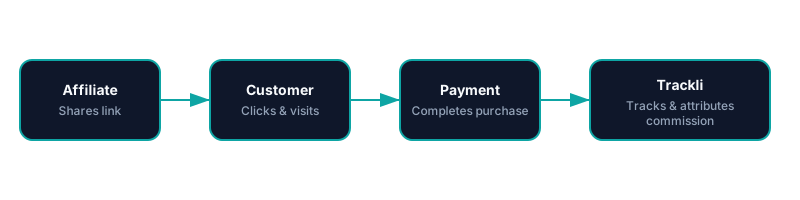
From referral link to commission payout — fully automated with Google Play.
Trackli vs Traditional Affiliate Tracking
See how Trackli compares to manual or legacy affiliate solutions.
| Feature | Trackli | Traditional |
|---|---|---|
| Install Referrer Tracking | Uses Play Install Referrer API for deterministic attribution | Fingerprint-based matching with high error rates |
| In-App Purchase Verification | Server-side verification via Google Play Developer API | Client-side reporting vulnerable to manipulation |
| Google Fee Adjustment | Commissions on net revenue after Google's service fee | Commissions on gross price before platform fees |
| Subscription Tracking | Tracks renewals, grace periods, and account holds | No awareness of Play subscription lifecycle |
| User Quality Scoring | Retention and engagement metrics per affiliate source | Install count only, no quality indicators |
| Regional Pricing Support | Handles country-specific Play Store pricing correctly | Single currency tracking, no regional awareness |
Frequently Asked Questions
How does Trackli use Google Play's install referrer?
Does Trackli verify in-app purchases through Google's APIs?
How are Google Play subscription renewals tracked?
Can I track apps distributed outside Google Play?
How does Trackli handle different prices across countries?
Related Use Cases
Explore more ways to use Trackli for affiliate tracking.
Affiliate Tracking for App Store Apps
Apple's App Store doesn't expose referral data to developers directly. Trackli bridges this gap by tracking affiliate clicks before the App Store redirect, then matching installations and purchases via server-side receipt validation to accurately attribute conversions to affiliates.
Learn moreAffiliate Tracking for Micro-SaaS
Micro-SaaS products thrive on word-of-mouth and niche communities. Trackli gives solo founders and small teams an affordable affiliate program that doesn't require enterprise budgets or complex technical integration — set it up in an afternoon and start growing.
Learn moreAffiliate Tracking for Online Software Products
Online software comes in many forms — web apps, desktop software, browser extensions, mobile apps, and APIs. Trackli provides flexible affiliate tracking that works across all software distribution models, connecting referral attribution to actual purchases regardless of how your product is delivered.
Learn moreReady to launch your affiliate program?
Start tracking affiliate referrals in minutes. No complex setup, no enterprise pricing.