
Affiliate Tracking for Online Software Products
Online software comes in many forms — web apps, desktop software, browser extensions, mobile apps, and APIs. Trackli provides flexible affiliate tracking that works across all software distribution models, connecting referral attribution to actual purchases regardless of how your product is delivered.
How to Set Up Online Software Products Affiliate Tracking
Get up and running in minutes with these simple steps.
Identify Your Distribution Model
Whether you sell through your website, app stores, or direct downloads, Trackli adapts to your distribution method. Configure tracking for your specific model.
Connect Purchase Events
Link your purchase or license activation events to Trackli. Support for payment providers, license key systems, and custom checkout flows.
Set Up Cross-Platform Attribution
If your software runs on multiple platforms (web, desktop, mobile), configure unified attribution that tracks referrals across all distribution channels.
Configure License-Based Commissions
For perpetual license software, set one-time commissions. For subscriptions, configure recurring commissions. For freemium, set conversion-based tracking.
Launch Across Software Directories
List your affiliate program on software review sites, alternative directories, and niche software communities. Track partner performance across channels.
How It Works
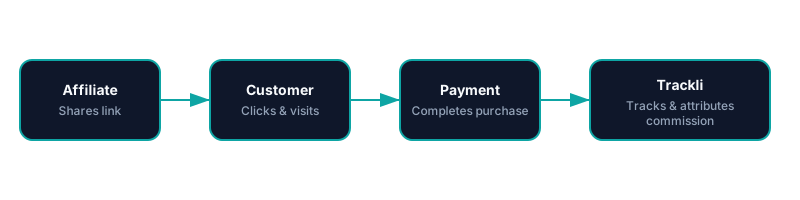
From referral link to commission payout — fully automated with Online Software Products.
Trackli vs Traditional Affiliate Tracking
See how Trackli compares to manual or legacy affiliate solutions.
| Feature | Trackli | Traditional |
|---|---|---|
| Distribution Model Flexibility | Supports web apps, desktop downloads, and mobile apps | Web-only or e-commerce checkout tracking |
| License Key Attribution | Links license activations to referring affiliates | No license key tracking capability |
| Perpetual vs Subscription | Different commission models for each pricing type | One model for all product types |
| Free Trial Tracking | Tracks download/trial through purchase conversion | Purchase-only tracking without trial funnel |
| Software Directory Integration | Tracks referrals from Capterra, G2, and software directories | No awareness of software directory referrals |
| Cross-Platform Attribution | Unified tracking across web, desktop, and mobile | Separate tracking per platform |
Frequently Asked Questions
Does Trackli work for desktop software, not just web SaaS?
How do I track referrals for perpetual license software?
Can I track referrals from software review sites?
How does cross-platform attribution work?
Does Trackli support both freemium and paid software models?
Related Use Cases
Explore more ways to use Trackli for affiliate tracking.
Affiliate Tracking for No-Code Tools
No-code tools grow through community evangelism — template creators, tutorial makers, and community experts who show others what's possible. Trackli helps you reward these ambassadors with commissions when their content drives new paying users to your platform.
Learn moreAffiliate Tracking for Developer Tools
Developer tools sell through trust, technical content, and community recommendations. Trackli helps you build an affiliate program that rewards the technical writers, YouTubers, and open-source contributors who drive developers to your tool through authentic, educational content.
Learn moreAffiliate Tracking for SaaS Affiliate Programs
Running a SaaS affiliate program is different from e-commerce or physical product affiliates. Trackli is purpose-built for SaaS — handling recurring revenue attribution, subscription lifecycle tracking, and partner management in a single platform designed for how SaaS businesses actually work.
Learn moreReady to launch your affiliate program?
Start tracking affiliate referrals in minutes. No complex setup, no enterprise pricing.