
Affiliate Tracking for No-Code Platforms
No-code tools grow through community evangelism — template creators, tutorial makers, and community experts who show others what's possible. Trackli helps you reward these ambassadors with commissions when their content drives new paying users to your platform.
How to Set Up No-Code Tools Affiliate Tracking
Get up and running in minutes with these simple steps.
Install Tracking Without Code
Add Trackli's tracking to your no-code platform using our script tag. No development team needed — just paste into your site's header.
Connect Your Payment Processing
Link Stripe or your payment provider. Trackli automatically tracks which signups convert to paid plans.
Recruit Template Creators
Your best affiliates are creators who build templates on your platform. Offer them commissions when users they attract through templates convert to paid.
Set Up Community Ambassador Tiers
Create tiered commission structures that reward your most active community members with escalating rates as they refer more users.
Track Template Marketplace Referrals
If you have a template or plugin marketplace, track which templates drive the most paid conversions and reward those creators accordingly.
How It Works
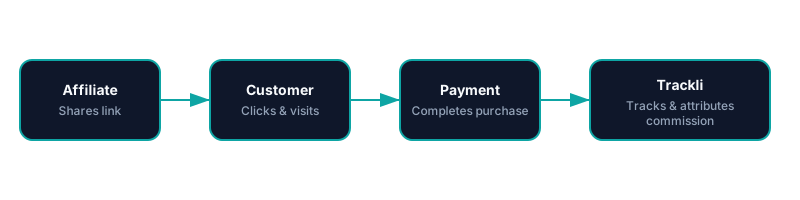
From referral link to commission approval — fully automated with No-Code Tools. You pay your affiliates however you already do.
Frequently Asked Questions
Can I set up Trackli without any coding?
How do I reward template creators who drive signups?
Can I create different commission tiers for community members?
How do I track referrals from YouTube tutorials?
What if users sign up for free and take weeks to upgrade?
Related Use Cases
Explore more ways to use Trackli for affiliate tracking.
Affiliate Tracking for Webflow Memberships
Running a membership site on Webflow? Trackli lets you add a full affiliate program without leaving the Webflow ecosystem. Track which partners drive your membership signups and pay commissions on both initial conversions and recurring membership payments.
Learn moreSimple Affiliate Tracking for Startups
You don't need a complex affiliate platform to start growing with partners. Trackli is the simplest way for startups to launch an affiliate program — set it up in 10 minutes, share links with partners, and let automation handle tracking, attribution, and payouts.
Learn moreReady to launch your affiliate program?
Start tracking affiliate referrals in minutes. No complex setup, no enterprise pricing.