
Affiliate Tracking for Webflow Memberships
Running a membership site on Webflow? Trackli lets you add a full affiliate program without leaving the Webflow ecosystem. Track which partners drive your membership signups and pay commissions on both initial conversions and recurring membership payments.
How to Set Up Webflow Memberships Affiliate Tracking
Get up and running in minutes with these simple steps.
Add Trackli Script to Webflow
Paste a single tracking script into your Webflow site's custom code section. This enables first-party cookie tracking across your entire site.
Configure Membership Webhook
Set up a Webflow webhook or use Trackli's Zapier integration to notify Trackli when a new membership is created or a payment is processed.
Set Membership Tier Commissions
Define commission rates for each membership tier. Higher-priced tiers can have different commission structures to incentivize premium referrals.
Build Affiliate Landing Pages in Webflow
Create dedicated landing pages in Webflow for your affiliate program. Trackli provides embeddable signup forms that match your Webflow design.
Enable Affiliate Self-Service
Affiliates access their own dashboard to view clicks, signups, earnings, and payout history. Customize the portal to match your Webflow site branding.
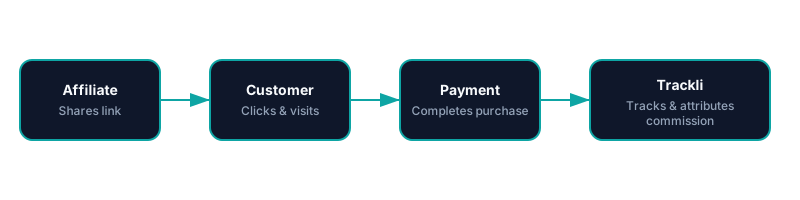
How It Works
From referral link to commission approval — fully automated with Webflow Memberships. You pay your affiliates however you already do.
Frequently Asked Questions
Do I need to know how to code to set up Trackli with Webflow?
Can I track referrals to specific Webflow CMS pages?
How does Trackli handle different Webflow membership tiers?
Can affiliates see their performance data?
Does Trackli work with Webflow's native payment processing?
Related Use Cases
Explore more ways to use Trackli for affiliate tracking.
Affiliate Tracking for No-Code Tools
No-code tools grow through community evangelism — template creators, tutorial makers, and community experts who show others what's possible. Trackli helps you reward these ambassadors with commissions when their content drives new paying users to your platform.
Learn moreAffiliate Tracking for Subscription SaaS
Subscription SaaS businesses need affiliate tracking that understands recurring revenue. Trackli tracks the entire customer lifecycle from initial referral through trial conversion, monthly renewals, upgrades, and even churn — attributing every event to the right affiliate partner.
Learn moreSimple Affiliate Tracking for Startups
You don't need a complex affiliate platform to start growing with partners. Trackli is the simplest way for startups to launch an affiliate program — set it up in 10 minutes, share links with partners, and let automation handle tracking, attribution, and payouts.
Learn moreReady to launch your affiliate program?
Start tracking affiliate referrals in minutes. No complex setup, no enterprise pricing.