
Affiliate Tracking for Developer Tools
Developer tools sell through trust, technical content, and community recommendations. Trackli helps you build an affiliate program that rewards the technical writers, YouTubers, and open-source contributors who drive developers to your tool through authentic, educational content.
How to Set Up Developer Tools Affiliate Tracking
Get up and running in minutes with these simple steps.
Add Trackli's Tracking Script
Trackli's script runs on your own domain as a first-party script. First-party cookies are not blocked by most ad blockers — developers use them more than any other audience.
Integrate with Your Billing
Connect Stripe, Paddle, or your custom billing to track paid conversions. Support for per-seat, usage-based, and flat-rate developer tool pricing.
Create Technical Affiliate Resources
Provide affiliates with code snippets, comparison tables, and technical deep-dives they can embed in blog posts and tutorials.
Set Developer-Appropriate Commissions
Developer tools often have high customer LTV. Offer 20-30% recurring commissions to attract technical content creators.
Recruit from Developer Communities
Reach out to writers on Dev.to, Hashnode, and personal tech blogs. Target developers who already write about your tool's category.
How It Works
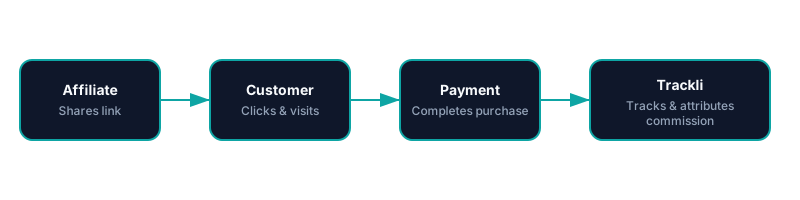
From referral link to commission approval — fully automated with Developer Tools. You pay your affiliates however you already do.
Frequently Asked Questions
How does Trackli handle ad blockers that developers commonly use?
Can affiliates link from GitHub README files?
How do I attract technical content creators as affiliates?
Does Trackli track per-seat expansion revenue?
What about developers who evaluate tools for weeks before buying?
Related Use Cases
Explore more ways to use Trackli for affiliate tracking.
Affiliate Tracking for API Products
API products have unique monetization models — metered usage, tiered rate limits, and developer-centric onboarding. Trackli tracks affiliate referrals through API key signups, tracks usage-based revenue, and calculates commissions on the actual consumption each referred developer generates.
Learn moreAffiliate Tracking for AI Tools
AI tools often use unique pricing models — credits, tokens, usage-based billing, or freemium-to-paid conversions. Trackli handles the complexity of tracking referrals for AI products where revenue per customer varies wildly based on actual usage patterns.
Learn moreAffiliate Tracking for No-Code Tools
No-code tools grow through community evangelism — template creators, tutorial makers, and community experts who show others what's possible. Trackli helps you reward these ambassadors with commissions when their content drives new paying users to your platform.
Learn moreReady to launch your affiliate program?
Start tracking affiliate referrals in minutes. No complex setup, no enterprise pricing.