
Recurring Revenue Affiliate Tracking for SaaS
The defining feature of SaaS is recurring revenue, and your affiliate tracking should reflect that. Trackli automatically tracks every renewal payment back to the original referring affiliate, calculating commissions month after month without manual spreadsheets or workarounds.
How to Set Up Recurring Revenue SaaS Affiliate Tracking
Get up and running in minutes with these simple steps.
Connect Recurring Billing
Link your subscription billing platform to Trackli. We support all major providers that handle recurring charges including Stripe, Chargebee, Recurly, and Paddle.
Define Recurring Commission Terms
Set how long affiliates earn recurring commissions: 6 months, 12 months, 24 months, or lifetime. Configure the percentage for each billing cycle.
Handle Billing Cycle Variations
Configure how commissions work for monthly vs annual billing. Many SaaS companies offer different rates for affiliates whose referrals choose annual plans.
Automate Renewal Attribution
Trackli automatically processes renewal events from your billing provider. No manual matching — every renewal payment is linked to the original referral.
Review and Approve Recurring Commissions
Trackli batches recurring commissions for your review each cycle. You approve and pay affiliates however works for your business — bank transfer, PayPal, or any method you already use.
How It Works
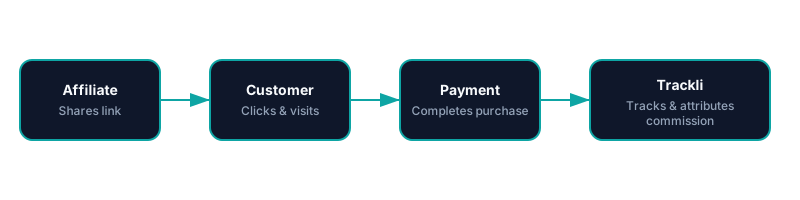
From referral link to commission approval — fully automated with Recurring Revenue SaaS. You pay your affiliates however you already do.
Frequently Asked Questions
How long should I pay recurring commissions?
What happens when a referred customer churns?
Can I offer different rates for annual vs monthly subscriptions?
How does Trackli calculate commissions when customers upgrade?
Can I see how much MRR is driven by affiliates?
Related Use Cases
Explore more ways to use Trackli for affiliate tracking.
Track Recurring Affiliate Commissions
Stop tracking recurring commissions in spreadsheets. Trackli automates the entire process — from catching renewal events to calculating commission amounts to scheduling payouts. Every subscription payment is automatically linked to the affiliate who brought the customer in.
Learn moreAffiliate Tracking for Subscription SaaS
Subscription SaaS businesses need affiliate tracking that understands recurring revenue. Trackli tracks the entire customer lifecycle from initial referral through trial conversion, monthly renewals, upgrades, and even churn — attributing every event to the right affiliate partner.
Learn moreTrack Affiliate Sales for Subscriptions
Subscription sales require attribution that persists beyond the first transaction. Trackli tracks the complete journey — from an affiliate's referral link click through subscription activation and every subsequent renewal — so you always know which partners are driving your recurring revenue.
Learn moreReady to launch your affiliate program?
Start tracking affiliate referrals in minutes. No complex setup, no enterprise pricing.