
Affiliate Tracking for Paddle Subscriptions
Paddle's Merchant of Record model handles tax, compliance, and payments — but it complicates affiliate tracking because you don't receive gross revenue. Trackli solves this by tracking Paddle subscription events and calculating commissions on your actual net payout amount.
How to Set Up Paddle Subscriptions Affiliate Tracking
Get up and running in minutes with these simple steps.
Connect Paddle Subscription Products
Link your Paddle account and select subscription products for affiliate tracking. Trackli pulls product details and pricing information.
Register Subscription Event Webhooks
Add Trackli's endpoint for subscription_created, subscription_payment_succeeded, subscription_updated, and subscription_cancelled events.
Configure Net Revenue Commissions
Set commission rates based on your net payout from Paddle after their fees and taxes. Trackli calculates this automatically from webhook data.
Handle Paddle's Pricing Tiers
Map commission rates to Paddle's pricing plans. Support for different rates on monthly vs annual plans processed through Paddle.
Reconcile with Paddle Payouts
Trackli's reporting aligns with Paddle's payout reports. Compare affiliate commission totals against your actual Paddle revenue received.
How It Works
From referral link to commission payout — fully automated with Paddle Subscriptions.
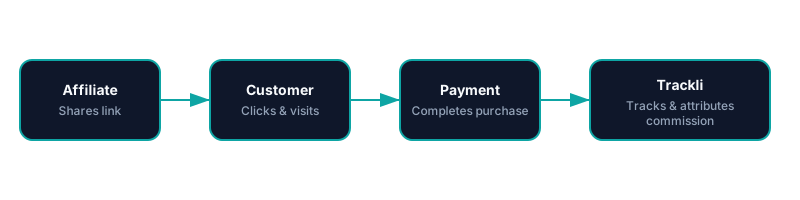
Trackli vs Traditional Affiliate Tracking
See how Trackli compares to manual or legacy affiliate solutions.
| Feature | Trackli | Traditional |
|---|---|---|
| Net Revenue Awareness | Commissions on payout amount after Paddle fees and taxes | Commissions on gross price leading to overpayment |
| Subscription Lifecycle Events | Full lifecycle: create, pay, update, pause, cancel | Purchase event only, no subscription awareness |
| Paddle Billing v2 Support | Supports both Paddle Classic and new Billing API | Only supports one version, requires migration |
| Geographic Pricing | Handles Paddle's country-specific pricing correctly | Single price assumption regardless of buyer location |
| Payout Reconciliation | Reports align with Paddle payout statements | Separate tracking system with reconciliation gaps |
| Subscription Pause Handling | Pauses commission tracking during subscription pauses | Continues counting commission during paused periods |
Frequently Asked Questions
Why is affiliate tracking different with Paddle subscriptions?
Does Trackli support Paddle's subscription pause feature?
How does Paddle's geographic pricing affect commissions?
Does Trackli work with both Paddle Classic and Paddle Billing?
How do I reconcile Trackli commissions with Paddle payouts?
Related Use Cases
Explore more ways to use Trackli for affiliate tracking.
Affiliate Tracking for Paddle
Paddle acts as your Merchant of Record, which means traditional affiliate tools can't see your actual revenue. Trackli integrates directly with Paddle's event system to accurately track referrals and calculate commissions on net revenue after Paddle's fees.
Learn moreAffiliate Tracking for SaaS Using Paddle Billing
Paddle Billing (v2) introduces a modern API with improved subscription management, customer portals, and checkout experiences. Trackli fully supports the new Paddle Billing API, giving you accurate affiliate tracking that leverages the latest Paddle platform capabilities.
Learn moreTrack Recurring Affiliate Commissions
Stop tracking recurring commissions in spreadsheets. Trackli automates the entire process — from catching renewal events to calculating commission amounts to scheduling payouts. Every subscription payment is automatically linked to the affiliate who brought the customer in.
Learn moreReady to launch your affiliate program?
Start tracking affiliate referrals in minutes. No complex setup, no enterprise pricing.