
Track Affiliate Referrals for Stripe Checkout
Stripe Checkout provides a conversion-optimized payment experience, but it can break traditional affiliate tracking by redirecting to Stripe-hosted pages. Trackli maintains attribution through the entire Checkout flow using client_reference_id and metadata, so no referral is ever lost.
How to Set Up Stripe Checkout Affiliate Tracking
Get up and running in minutes with these simple steps.
Pass Referral Data to Checkout
Add Trackli's client_reference_id to your Stripe Checkout Session creation. This embeds the affiliate identifier directly in the Checkout flow.
Listen for checkout.session.completed
Trackli reads the client_reference_id from the completed session and attributes the payment to the referring affiliate.
Set commission rules
Percentage or flat-rate, on the gross amount charged, for one-time purchases and for subscriptions started through Checkout. Renewals earn recurring commissions on each invoice.paid.
Verify with a referred purchase
Click your own referral link, complete a Checkout, and watch the pending commission appear in the Trackli dashboard for approval.
How It Works
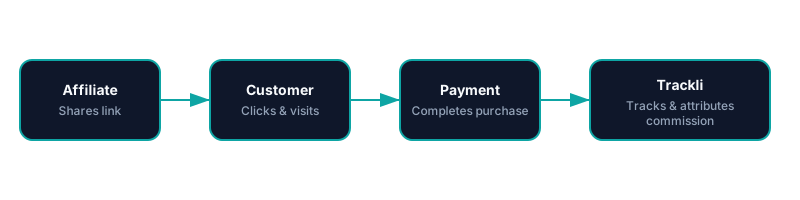
From referral link to commission approval — fully automated with Stripe Checkout. You pay your affiliates however you already do.
Frequently Asked Questions
How does Trackli maintain attribution through Stripe Checkout?
What if the customer clears cookies before paying?
What about multi-product Checkout sessions?
Do refunds through Stripe affect commissions?
Do I need to modify my Stripe Checkout code?
Related Use Cases
Explore more ways to use Trackli for affiliate tracking.
Stripe Affiliate Tracking — Native Integration, Flat $29, No Caps
Connect Trackli to your Stripe account and start tracking affiliate-driven revenue in minutes. Automatically attribute payments to the right affiliates using webhooks, and handle recurring commissions without lifting a finger.
Learn moreAffiliate Tracking for SaaS Affiliate Programs
Running a SaaS affiliate program is different from e-commerce or physical product affiliates. Trackli is purpose-built for SaaS — handling recurring revenue attribution, subscription lifecycle tracking, and partner management in a single platform designed for how SaaS businesses actually work.
Learn moreTrack Recurring Affiliate Commissions
Stop tracking recurring commissions in spreadsheets. Trackli automates the entire process — from catching renewal events to calculating commission amounts to scheduling payouts. Every subscription payment is automatically linked to the affiliate who brought the customer in.
Learn moreReady to launch your affiliate program?
Start tracking affiliate referrals in minutes. No complex setup, no enterprise pricing.