
Affiliate Tracking for Stripe Subscriptions
Stripe Subscriptions power millions of recurring billing relationships. Trackli hooks into Stripe's subscription lifecycle events — creation, renewal, upgrade, downgrade, and cancellation — to maintain perfect attribution and calculate recurring commissions automatically.
How to Set Up Stripe Subscriptions Affiliate Tracking
Get up and running in minutes with these simple steps.
Connect Stripe Subscriptions
Link your Stripe account and select which subscription products should be tracked for affiliate commissions.
Configure Subscription Webhooks
Trackli registers for customer.subscription.created, invoice.paid, customer.subscription.updated, and customer.subscription.deleted events.
Set Recurring Commission Parameters
Define the commission percentage, duration (months or lifetime), and whether to include prorated amounts from mid-cycle changes.
Handle Trials and Setup Fees
Configure how trial periods and setup fees affect commissions. Choose whether affiliates earn on setup fees separately from recurring charges.
Test with Stripe Test Mode
Use Stripe's test mode to simulate the complete subscription lifecycle. Verify that commissions are calculated correctly for creates, renewals, and cancellations.
How It Works
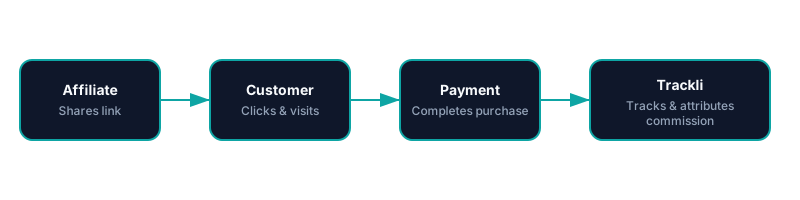
From referral link to commission approval — fully automated with Stripe Subscriptions. You pay your affiliates however you already do.
Frequently Asked Questions
How does Trackli track Stripe subscription renewals?
What happens with prorated charges from plan changes?
Can I exclude trial periods from commission calculations?
Does Trackli work with Stripe metered billing?
How do I test affiliate tracking with Stripe subscriptions?
Related Use Cases
Explore more ways to use Trackli for affiliate tracking.
Affiliate Tracking for Stripe
Connect Trackli to your Stripe account and start tracking affiliate-driven revenue in minutes. Automatically attribute payments to the right affiliates using webhooks, and handle recurring commissions without lifting a finger.
Learn moreTrack Affiliate Referrals for Stripe Checkout
Stripe Checkout provides a conversion-optimized payment experience, but it can break traditional affiliate tracking by redirecting to Stripe-hosted pages. Trackli maintains attribution through the entire Checkout flow using client_reference_id and metadata, so no referral is ever lost.
Learn moreAffiliate Tracking for SaaS Using Stripe and Webhooks
Webhooks are the backbone of reliable Stripe integrations. Trackli processes Stripe webhook events in real time to track referrals, calculate commissions, and handle the full subscription lifecycle — giving you the most accurate affiliate attribution possible for your SaaS product.
Learn moreReady to launch your affiliate program?
Start tracking affiliate referrals in minutes. No complex setup, no enterprise pricing.