
Affiliate Tracking for Chargebee Subscriptions
Chargebee excels at complex subscription management with plan families, addons, and sophisticated trial flows. Trackli integrates with Chargebee's event system to track every subscription change, calculating affiliate commissions accurately across even the most complex billing scenarios.
How to Set Up Chargebee Subscriptions Affiliate Tracking
Get up and running in minutes with these simple steps.
Connect Chargebee Site
Enter your Chargebee site name and API key. Trackli connects and imports your plan catalog, addon configurations.
Map Plans to Commission Structures
Assign commission rates to plan families or individual plans. Chargebee's plan hierarchy lets you set rates at the family level or override per plan.
Handle Addon Commissions
Configure whether Chargebee subscription addons are commissionable. Set rates for recurring addons and one-time addon charges separately.
Manage Trial-to-Paid Attribution
Chargebee's flexible trial system is fully supported. Set hold periods matching your trial durations and configure conversion event triggers.
Enable Automated Reporting
Set up automated commission reports that align with Chargebee's billing cycles. Export data for your own records and review.
How It Works
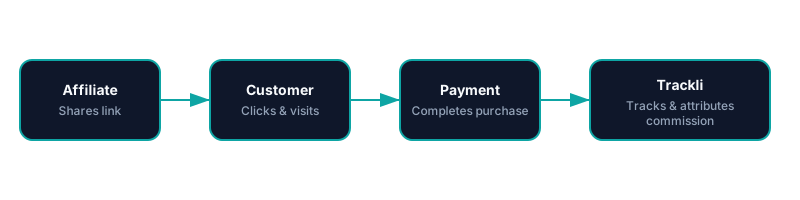
From referral link to commission approval — fully automated with Chargebee Subscriptions. You pay your affiliates however you already do.
Frequently Asked Questions
How does Trackli handle Chargebee plan families?
Are Chargebee addons commissionable?
How does Trackli handle Chargebee credit notes?
What if a customer has multiple Chargebee subscriptions?
Can I align Trackli reports with Chargebee's billing reports?
Related Use Cases
Explore more ways to use Trackli for affiliate tracking.
Affiliate Tracking for Chargebee
Chargebee powers complex subscription billing with trials, coupons, and plan hierarchies. Trackli plugs into Chargebee's event stream to attribute signups, trial conversions, and recurring payments to the affiliate who drove each customer.
Learn moreAffiliate Tracking for SaaS Using Chargebee Billing
Chargebee's billing engine handles complex pricing models and subscription lifecycles. Trackli integrates at the billing level, using Chargebee's event system to track every billable action and calculate affiliate commissions with invoice-level precision.
Learn moreTrack Affiliate Sales for Subscriptions
Subscription sales require attribution that persists beyond the first transaction. Trackli tracks the complete journey — from an affiliate's referral link click through subscription activation and every subsequent renewal — so you always know which partners are driving your recurring revenue.
Learn moreReady to launch your affiliate program?
Start tracking affiliate referrals in minutes. No complex setup, no enterprise pricing.